The Procurement Process Explained: A Step-by-Step Guide for Businesses
Every business buys things, from laptops to software to office supplies. The procurement process is the set of steps that makes sure you buy the right thing, at a fair price, from a supplier you can trust. This guide explains the process in seven clear steps, shows who should approve what, and covers the extra steps IT purchases need that most guides skip.
What is the procurement process?
The procurement process is how a business gets what it needs, from spotting the need to paying the supplier and checking how they did. It is more than buying. It also covers setting a budget, checking suppliers, getting approval and keeping records.
A good process stops overspending, keeps you away from weak suppliers and gives finance a clear trail for every purchase. For the wider picture, read our end-to-end procurement guide. If you would rather have an expert run it for you, see our IT procurement services.
Why a clear process matters
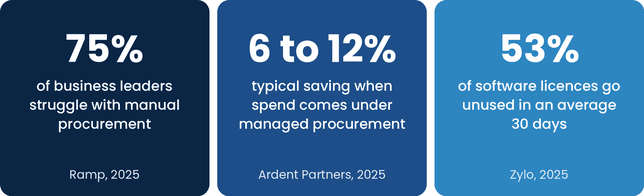
Without a process, buying happens in a rush and nobody sees the full picture. A 2025 Ramp survey found that 75% of business leaders struggle with manual procurement and 63% lack early spend controls. Bringing spend under proper management pays off: Ardent Partners research puts typical savings at 6% to 12% in the first contract period. Software shows the problem clearly, because the Zylo 2025 SaaS Management Index found 53% of software licences go unused in an average 30 days.
These figures come from vendor and analyst studies, so treat them as a guide. The message is still clear: a simple process saves money.
The procurement process in 7 steps
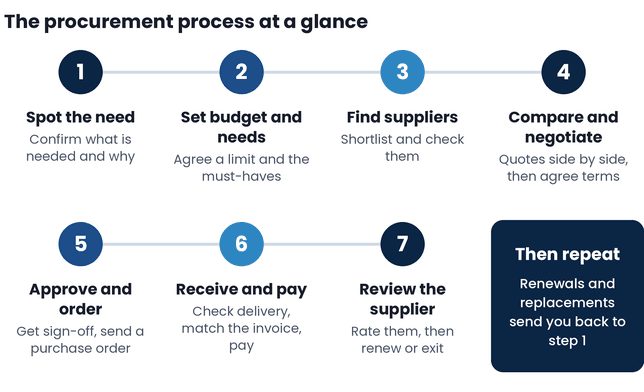
Here is the full process at a glance. Each step is explained below.
Step 1: Spot the need
Start by asking what is needed and why. Check whether something you already own can do the job. Note who needs it, by when, and what happens if you wait. A short, clear request now saves back and forth later.
Step 2: Set the budget and requirements
Agree how much you can spend and what the purchase must do. List the must-haves first and the nice-to-haves second. For IT, include security needs, support hours and how many people will use it.
Step 3: Find and check suppliers
Build a shortlist of two to five suppliers. Check their reputation, references, finances and security practices. Ask each one for the same information so you can compare them fairly.
Step 4: Compare quotes and negotiate
Ask each supplier for a written quote against the same requirements. Compare the total cost, not just the headline price, because delivery, set-up, support and contract length all count. Negotiate price, payment terms and renewal terms before you agree. For a wider view, read about strategic IT procurement.
Step 5: Get approval and place the order
Send your preferred quote to the right approver for the amount. Once approved, send the supplier a purchase order. This is a written order that sets out what you are buying, the price and the delivery date. It protects both sides.
Step 6: Receive, check and pay
Check the goods or service against your order when they arrive. Then match the supplier invoice to the purchase order and the delivery record before you pay. This is called a three-way match. If all three agree, pay on the agreed terms. If not, raise it before you pay.
Step 7: Review the supplier
After delivery, record how the supplier did: on time, as promised, good support? Keep notes for next time. Diary the contract end date so you can renew, renegotiate or leave on your terms, not theirs.
Who should approve what
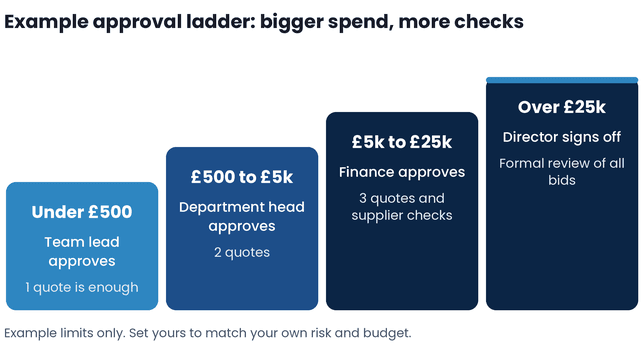
Not every purchase needs the same checks. A simple approval ladder keeps small buys fast and big buys safe. The limits below are examples. Set yours to match your own risk and budget, and write them into your buying policy.
Where IT purchases need extra steps
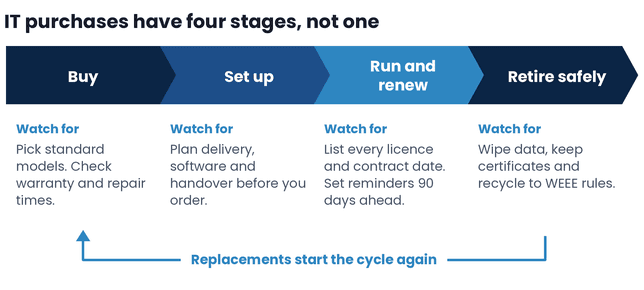
General buying guides treat a laptop like a box of pens. IT is different because the purchase does not end at delivery. Software renews, hardware needs setting up and old devices hold data. Our guide to the IT asset life cycle covers the full picture. Here are the extra steps to add.
Software and cloud renewals
Most software renews by itself unless you cancel it. Keep one list of every licence and renewal date, and set a reminder 90 days before each one. Check who really uses each licence, then cut or renegotiate before the date. Zylo research suggests companies renew one software application a day on average, so dates slip fast.
Hardware delivery and set-up
Plan delivery, set-up and handover before the order goes in. Decide who installs the device, loads the software and secures it, and whether it ships straight to the user. Ask about warranty and repair times too. A device that arrives but cannot be used for two weeks is not a finished purchase.
Safe disposal at the end
When a device is replaced, wipe the data and recycle it properly. UK GDPR requires you to protect personal data, and the WEEE Regulations 2013 set the rules for electrical waste. Ask for a certificate of data destruction for each device and keep it with your purchase records.
Common mistakes to avoid
- Buying before the need is clear: you end up with the wrong item or a duplicate.
- Choosing on price alone: support, set-up and renewal costs can outweigh a low headline price.
- Skipping supplier checks: a cheap supplier that fails costs more than a good one.
- Letting contracts renew without a review: you pay for services nobody uses.
- Leaving disposal until old devices pile up: data risk and compliance trouble grow with the pile.
For more on what goes wrong in practice, read our guide to IT procurement challenges.
How DDevices helps
At DDevices, we help UK businesses buy, set up, manage and retire their technology. Our team handles supplier checks, quotes and delivery, then supports each device through its working life and disposes of it safely. See our IT procurement services and IT lifecycle services for details.
- Sourcing and supplier comparison
- Deployment and set-up
- Ongoing management and support
- Secure, compliant disposal
Want a clearer way to buy IT?
Talk to a DDevices specialist about a simpler procurement process for your business.
Frequently asked questions
The procurement process is the set of steps a business follows to get what it needs, from spotting the need to paying the supplier and reviewing their work. It covers budgets, supplier checks, quotes, approval, ordering, delivery and records, so every purchase is fair, approved and easy to trace.
There are seven main steps. Spot the need, set the budget and requirements, find and check suppliers, compare quotes and negotiate, get approval and place the order, receive, check and pay, then review the supplier. Larger businesses add more detail, but these seven cover the core of almost every purchase.
Purchasing is the act of ordering and paying for something. Procurement is the whole process around it, including defining the need, choosing suppliers, negotiating, approving and reviewing results. Purchasing is one step inside procurement, which is why good procurement looks at value and risk, not just the order.
A purchase order is a written order you send to a supplier that states what you are buying, the price and the delivery date. It matters because it records what you agreed, helps finance match invoices, and gives you proof if the supplier delivers the wrong item or charges a different price.
It depends on the size and risk of the purchase. A small, low-risk buy can take a day or two. A larger or more complex purchase can take several weeks because of supplier checks, quotes and approvals. A clear approval ladder keeps small purchases quick and gives bigger ones the time they need.
IT purchases carry extra steps after delivery. Software renews automatically, hardware needs set-up and support, and old devices hold data that must be wiped before disposal. General buying ends when the goods arrive, but IT buying runs through renewals, upgrades and safe disposal, so it needs a plan for the whole life of the item.
Yes, but it can be light. A small business can use three habits: write down what you need and your budget, get at least two quotes, and keep the order and invoice together. As spending grows, add approval limits and a supplier list. The goal is control without slowing people down.
No, not to ordinary private sector purchases. The Procurement Act 2023 sets rules for public bodies and some utilities when they buy goods and services. If you sell to the public sector, you may need to follow its rules in your bids, so check the official guidance before you tender.