How to Secure the Modern Workplace Against Evolving Cyber Threats
Modern workplaces rely on cloud applications, connected devices and flexible working arrangements to support daily operations. However, these technologies also introduce security risks, from phishing and credential theft to ransomware and unauthorised data access. Protecting a modern workplace requires more than traditional antivirus software. UK businesses need coordinated security measures that protect employees, identities, devices and business information while maintaining productivity and resilience against evolving cyber threats
Understanding Evolving Cyber Threats in the Modern Workplace
The modern workplace is increasingly exposed to cyber threats as businesses rely on cloud platforms, connected devices, remote access and digital collaboration tools. Cybercriminals exploit these environments through phishing, stolen credentials, ransomware and vulnerabilities in internet-facing applications.
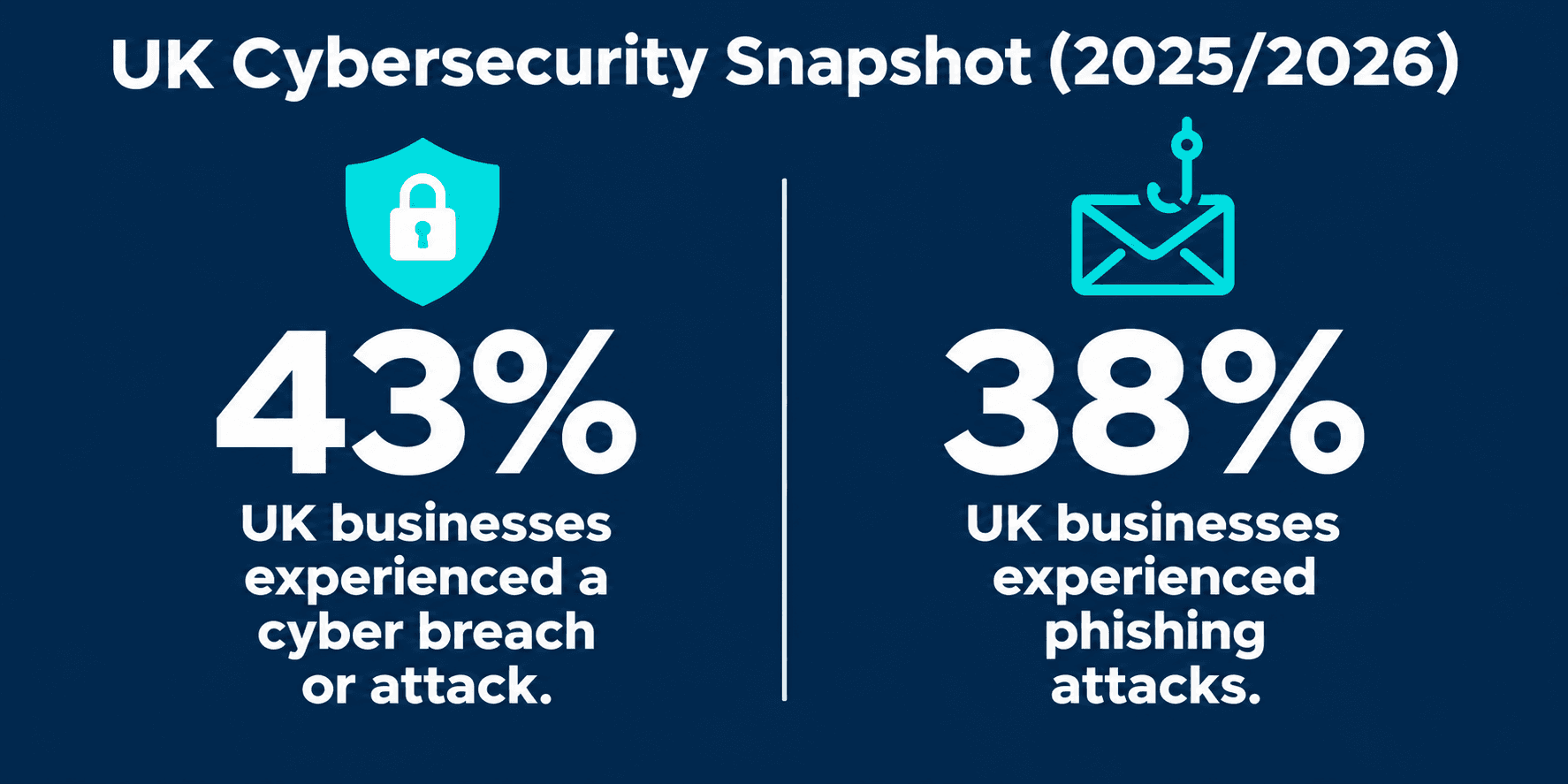
The scale of the problem is evident in the UK Government's Cyber Security Breaches Survey 2025/2026. The survey found that 43% of UK businesses experienced a cyber breach or attack during the previous 12 months, while 38% experienced phishing attacks.
The threat landscape is also evolving globally. According to IBM's X-Force Threat Intelligence Index 2026, exploitation of public-facing applications increased by 44% year on year. This highlights the importance of securing internet-accessible systems, applications and business infrastructure.
For organisations, workplace security is no longer limited to protecting office computers. It requires coordinated protection across employees, identities, devices, networks, cloud applications and business data.
Essential Security Controls for the Modern Workplace
Securing a modern workplace requires a layered approach. Businesses should combine technical safeguards, clear access policies and employee awareness to reduce the risk of unauthorised access, malware infections, data breaches and operational disruption.
1. Strengthen Identity and Access Management
Compromised credentials can give attackers access to business email, cloud platforms and sensitive information. Organisations should implement multi-factor authentication (MFA), particularly for administrator accounts and services accessible over the internet.
Apply role-based access controls and the principle of least privilege, ensuring employees can access only the systems and data required for their roles. Review permissions regularly, remove unnecessary privileges and immediately revoke access when employees leave or change responsibilities.
2. Improve Employee Cybersecurity Awareness
Employees are often targeted through phishing emails, fraudulent links, malicious attachments and impersonation attempts. Regular security awareness training helps staff recognise suspicious communications and understand how to report potential incidents.
Businesses should reinforce training with simulated phishing exercises, clear reporting procedures and verification processes for unusual payment or data-access requests. Employees should never be discouraged from reporting mistakes or suspicious activity.
3. Protect Business Devices and Endpoints
Laptops, desktops, smartphones and other connected devices can become entry points for cyberattacks. Organisations should deploy endpoint protection, enable device encryption and enforce automatic screen locking.
Keep operating systems, applications and firmware updated to address known vulnerabilities. Maintain an inventory of company devices and ensure that security policies also cover employee-owned devices approved for business use. Centralised device management can help IT teams enforce consistent security configurations across the workplace.
4. Secure Networks, Cloud Applications and Business Data
Modern workplaces depend on cloud platforms, collaboration tools and connected networks. Businesses should secure these environments through firewalls, network segmentation, secure remote access and appropriate cloud security configurations.
Third-party suppliers and service providers can also introduce security risks through their access to business systems and sensitive information. Organisations should assess vendor security practices, restrict supplier permissions and review third-party access regularly.
Sensitive information should be encrypted both in transit and at rest, with access restricted according to business requirements. Maintain regular backups and test recovery procedures to help restore operations following ransomware attacks or accidental data loss.
Establish clear security policies that define responsibilities for employees, IT teams and external providers. Regular access reviews, vulnerability assessments and management oversight help ensure that security controls remain effective as the organisation evolves.
The Information Commissioner's Office provides practical guidance on keeping IT systems safe and secure. For broader visibility, Microsoft's Security Exposure Management explains how organisations can identify assets, assess exposure and prioritise security risks across their environments.
Securing Remote and Hybrid Work Environments
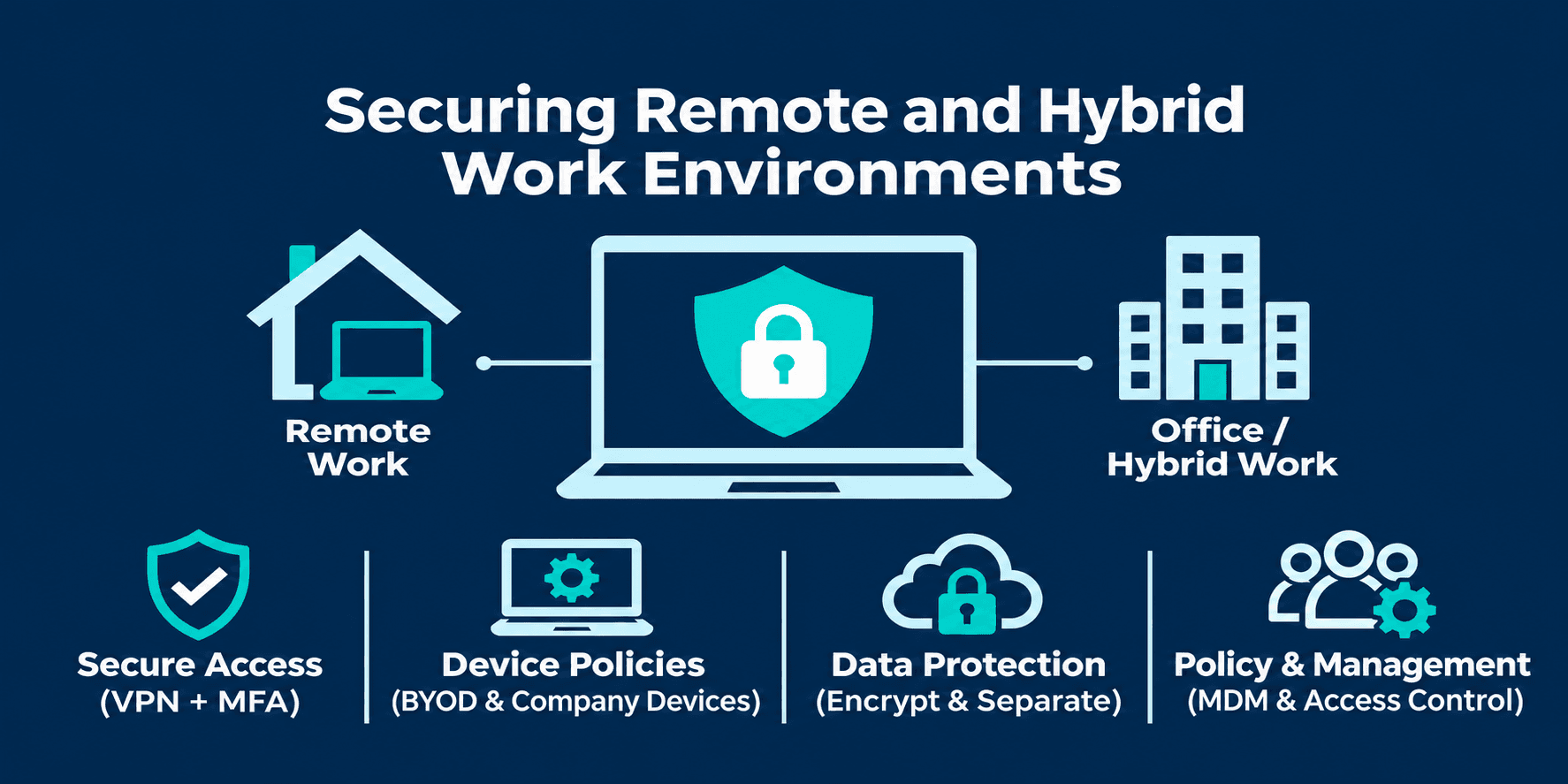
Remote and hybrid working increase flexibility but also extend the organisation's security perimeter beyond the traditional office network. Employees may access business systems through home networks, personal devices and public internet connections, creating additional risks if access is not properly managed.
Secure Remote Access
Require multi-factor authentication (MFA) for remote access to business applications and corporate systems. Use organisation-approved secure connections, such as a properly configured VPN where appropriate, and restrict access according to user roles and device security status.
The National Cyber Security Centre's VPN guidance explains how organisations can deploy and configure VPN connections securely.
Establish Clear Device and BYOD Policies
Set policies for company-owned and employee-owned devices (Bring Your Own Device or BYOD). Require supported operating systems, up-to-date security software, device encryption and screen locks. Where possible, use mobile device management (MDM) to enforce security settings and remotely manage business devices.
Keep business information separate from personal applications and storage, and define procedures for reporting lost or stolen devices. The Information Commissioner's Office BYOD guidance outlines the security considerations organisations should assess before allowing employees to use personal devices for work.
Continuous Monitoring and Incident Response
Preventive security controls are essential, but they cannot guarantee that every cyber threat will be stopped. Businesses need continuous monitoring and a structured incident response process to identify suspicious activity, limit damage and restore operations quickly.
Monitor Systems, Unusual User Activity and Data Exfiltration
Monitor networks, endpoints, cloud applications and user activity to identify suspicious behaviour, unauthorised access attempts and potential security incidents. Warning signs may include repeated failed login attempts, logins from unusual locations, unexpected privilege changes, access to sensitive files outside normal working patterns, or unusually large data transfers.
These behaviours may indicate compromised accounts, insider threats or attempts to move sensitive business information outside the organisation. Security Information and Event Management (SIEM) tools can collect and analyse logs from multiple systems, helping IT teams correlate events, detect anomalies and investigate potential threats.
Prepare an Incident Response and Recovery Plan
Create a documented incident response plan that defines responsibilities, escalation procedures and communication channels. Employees should know how to report suspicious activity, while IT teams should be prepared to isolate affected systems, investigate incidents and prevent further compromise.
Maintain secure, regularly tested backups and establish recovery priorities for critical business services. Conducting periodic incident response exercises can help teams understand their responsibilities before an actual attack occurs.
"DDevices Insight
Effective workplace security is not just about deploying more security tools. It is about ensuring that alerts are reviewed, risks are prioritised and incidents lead to corrective action. Businesses should regularly assess whether their monitoring, response and recovery processes are working together to reduce operational risk."
Building a Practical Workplace Security Strategy
A strong workplace security strategy should be based on an organisation's size, IT environment, business risks and regulatory responsibilities. Rather than implementing disconnected security tools, businesses should establish a structured approach that is regularly reviewed and improved.
Use the following checklist to assess your organisation's security readiness:
Measure Security Performance with KPIs
Implementing security controls is only the first step. Businesses should also track measurable cybersecurity Key Performance Indicators (KPIs) to evaluate their effectiveness and identify areas that need improvement.
| Security KPI | What it measures |
|---|---|
| MFA coverage | Percentage of employee and administrator accounts protected by multi-factor authentication. |
| Patch compliance rate | Percentage of devices updated with critical security patches within the defined timeframe. |
| Phishing reporting rate | Percentage of employees who correctly report simulated or suspected phishing attempts. |
| Mean Time to Detect (MTTD) | Average time taken to identify a security incident. |
| Mean Time to Respond (MTTR) | Average time taken to contain and respond to a detected incident. |
| Backup recovery success rate | Percentage of scheduled backup recovery tests completed successfully. |
Businesses should review these KPIs monthly or quarterly, establish realistic performance targets and investigate areas where results fall below expectations.
| Security priority | Recommended action |
|---|---|
| Identity protection | Enforce MFA and review user access permissions regularly. |
| Employee awareness | Provide regular cybersecurity training and phishing simulations. |
| Endpoint security | Protect laptops, desktops and mobile devices with updated security controls. |
| Network security | Secure remote connections, segment networks and review firewall configurations. |
| Cloud and data protection | Apply appropriate access controls, encryption and secure backup policies. |
| Monitoring | Review security alerts, system logs and vulnerabilities continuously. |
| Incident response | Maintain a documented response and recovery plan, and test it regularly. |
Businesses should also conduct periodic cybersecurity risk assessments to identify gaps, prioritise critical systems and allocate resources effectively. Security policies must evolve as the organisation adopts new technologies, introduces remote working arrangements or changes its business operations.
Why Choose DDevices?
Securing a modern workplace requires more than individual security products. It needs an integrated approach that connects infrastructure, cloud environments, employee devices and identity management.
DDevices helps UK organisations strengthen their IT environments through:
- Managed Security: 24/7 monitoring, threat detection, firewalls, endpoint protection and compliance auditing.
- Identity and Access Management: MFA and access controls to help protect business systems from unauthorised access.
- Secure Modern Workplace: Device management, automated provisioning and secure collaboration for office-based and hybrid teams.
- Cloud Security: Security-focused cloud environments, encryption and identity management across Azure, AWS and hybrid infrastructure.
- UK-Based Expertise: Security and IT services designed around UK business requirements and regulatory considerations.
With managed IT, cybersecurity and workplace solutions under one provider, DDevices can help organisations build a more secure, resilient and productive working environment.
Ready to strengthen your workplace security? Speak to the DDevices team to discuss your organisation's requirements.
Frequently Asked Questions
Modern workplace security is the combination of technologies, policies and practices used to protect employees, devices, networks, cloud applications and business data across office, remote and hybrid working environments.
Common threats include phishing, ransomware, stolen credentials, malware, software vulnerabilities, insider threats and unauthorised access to business systems.
Businesses should provide regular security awareness training, use email filtering, enable multi-factor authentication and establish clear procedures for reporting suspicious messages.
MFA adds an additional verification step beyond passwords, making it harder for attackers to access business accounts using stolen credentials alone.
Use secure remote access, MFA, endpoint protection, device encryption and clear BYOD policies. Regularly review access permissions and keep devices updated.
Endpoint security protects devices such as laptops, desktops and smartphones against malware, unauthorised access and other threats that could compromise business systems.
Businesses should continuously monitor security alerts and review their risk assessments and controls regularly, particularly after significant technology, workforce or operational changes.
Yes. Managed IT services can support continuous monitoring, threat detection, patch management, endpoint protection and incident response, helping organisations maintain stronger security controls.