
IT Asset Management: How to Extend the Life of Your IT Assets Without Increasing Risk
Hardware prices are rising, budgets are tight and many UK teams are choosing to keep laptops, servers and network kit for longer. That can save real money. It can also leave a door open for attackers if nobody checks what is still supported.
For CIOs, IT directors and procurement leaders, IT asset management is the control that makes longer lifecycles safe. This guide shows how to extend the life of your IT assets without increasing risk, using a four gate test and the latest UK data.
What is IT asset management?
IT asset management (ITAM) is the practice of tracking every hardware, software and cloud asset from purchase to retirement. It records what you own, who uses it, what it costs and when the vendor stops supporting it.
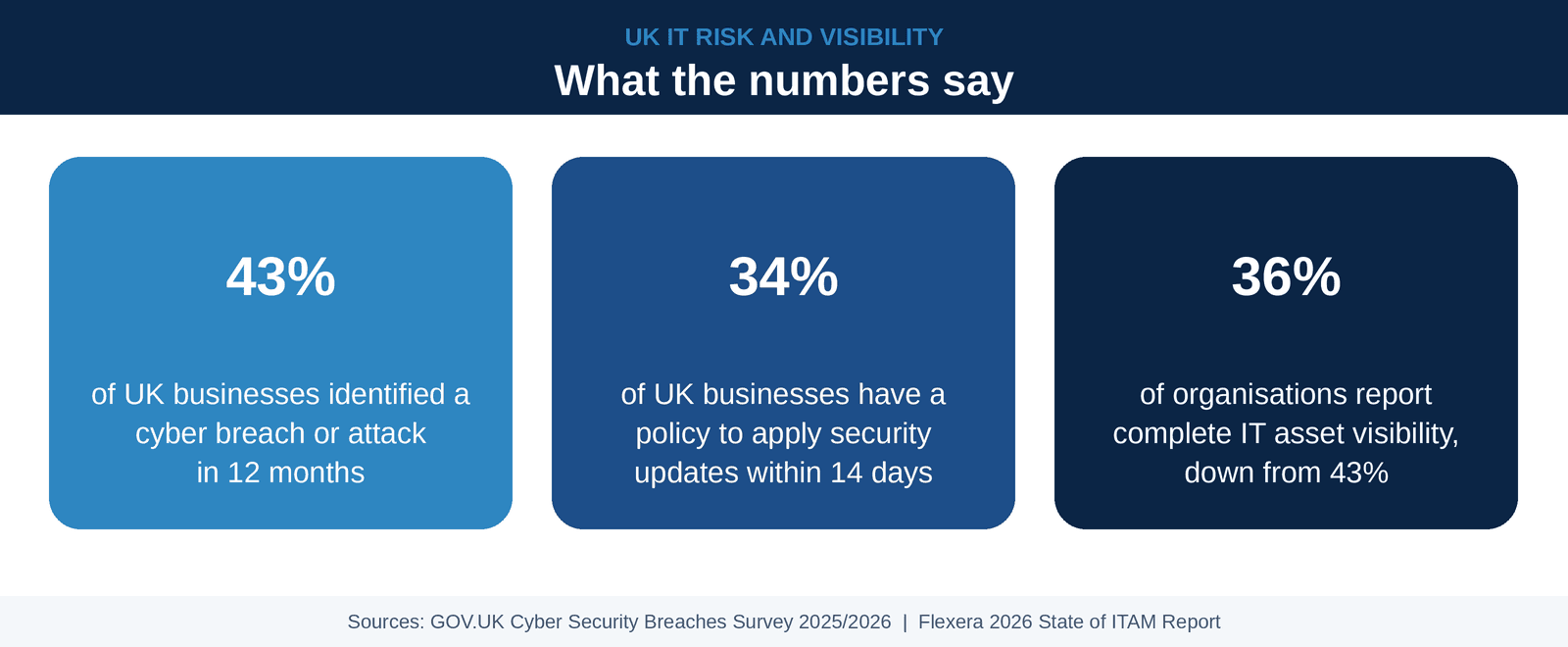
That last detail decides how long an asset can stay in service. Yet Flexera's 2026 State of ITAM report, a global survey of 512 professionals, found that only 36% of organisations have complete IT asset visibility, down from 43% a year earlier. The NCSC adds that asset management helps meet all five Cyber Essentials controls, so it belongs on the security agenda as well as the finance one.
Why extending asset life is now a budget decision
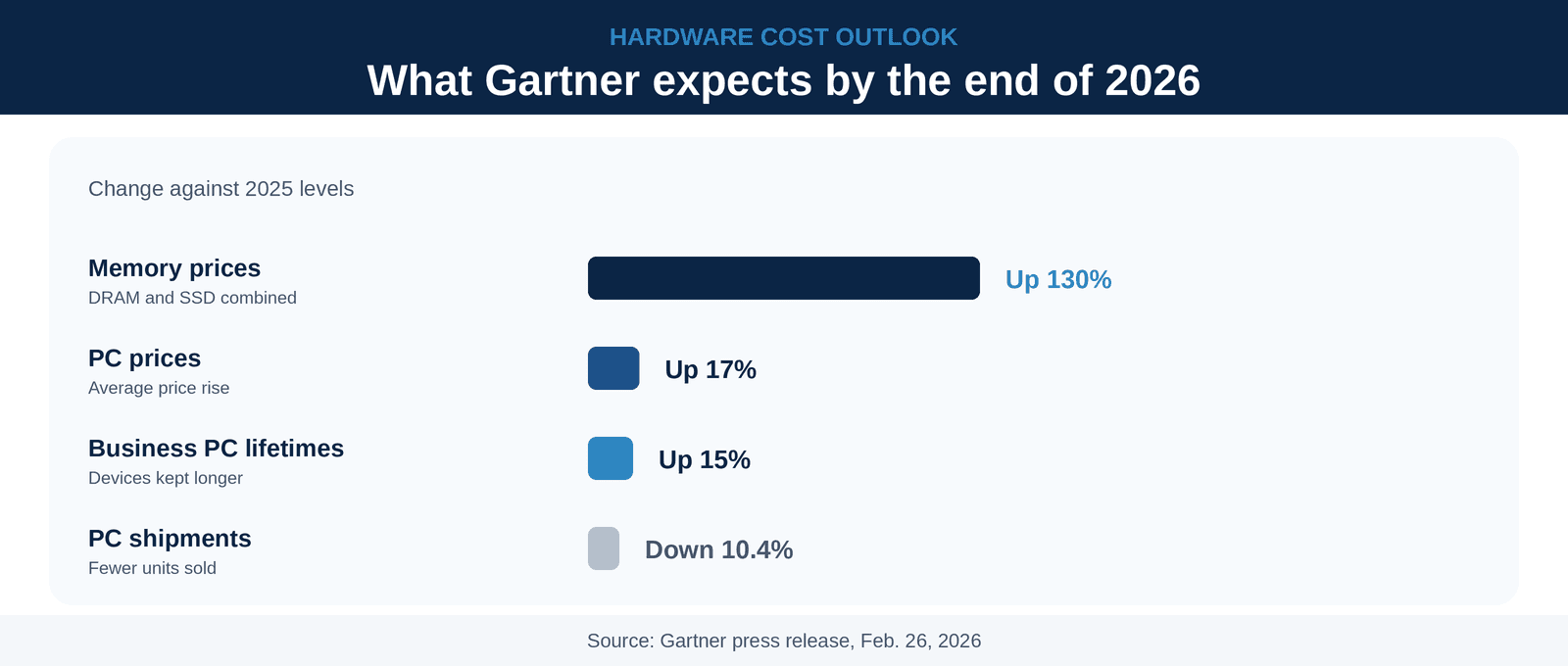
Memory is the reason. Gartner estimates that combined DRAM and SSD prices will rise 130% by the end of 2026, lifting PC prices by 17% against 2025. Memory will account for 23% of a PC's component cost, up from 16%.
Buyers are responding sensibly by keeping devices longer. Gartner also warns that older devices bring more security vulnerabilities and more work to manage. Longer life only pays off when risk stays flat.
Industry insight: Gartner expects business PC lifetimes to grow by 15% by the end of 2026. Yet only 34% of UK businesses have a policy to apply security updates within 14 days, according to the government's latest Cyber Security Breaches Survey. Longer lifecycles and slow patching make an unsafe pair.
Where extended assets go wrong
Age is not the problem. Support is. Once a vendor stops issuing fixes, every new weakness stays open. The NCSC says weaknesses in unsupported products remain unpatched and can be exploited by relatively low skilled attackers. Its advice is plain: the only fully effective fix is to stop using them.
Compliance draws the same line. Cyber Essentials requires all software in scope to be supported. Once support ends, the software must be removed or cut off from the internet. Critical and high risk fixes must go on within 14 days of release.
Windows 10 shows what is at stake. Microsoft ended support on Oct. 14, 2025. Organisations can buy Extended Security Updates for up to three years, starting at $61 per device in year one, and the price rises each year. It is a bridge, not a plan.
Edge devices carry the most risk. In its alert on Cisco firewalls, the NCSC said obsolete and end of life devices present a significant security risk and urged organisations to replace or upgrade them where practicable. That covers firewalls, routers and VPN gateways, so check them first.
The four gate test before you extend any asset
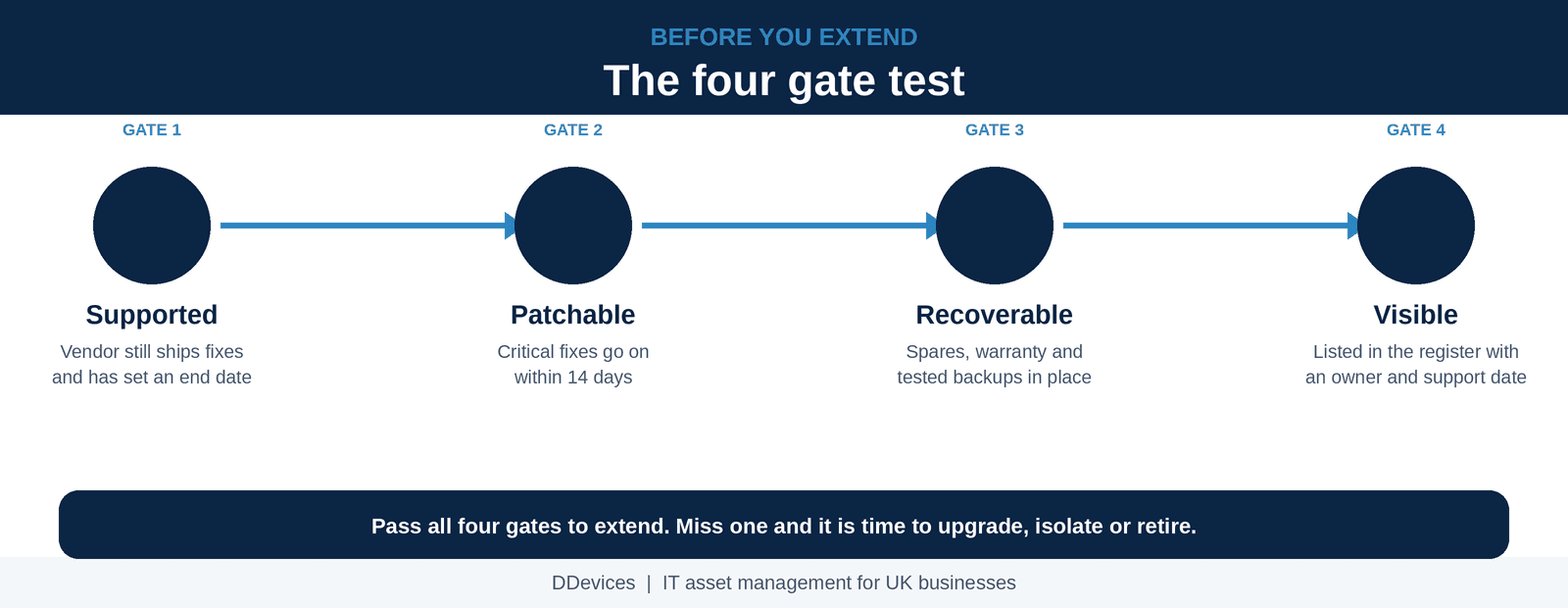
Most guides tell you to patch, clean and audit. Those steps help, but they skip the question that matters: should this asset stay at all? Use four gates. An asset must pass all four to earn more time.
1. Supported
Check that the vendor still ships security fixes and has published an end date. Cyber Essentials only treats software as supported when the vendor commits to fixes and names the date they will stop. Record that date in your register.
2. Patchable
Confirm that you can install critical fixes within 14 days. Only 34% of UK businesses have a policy to do so. If your team cannot hit that window, fix the process before you extend the hardware.
3. Recoverable
Plan for failure. Check warranty status, keep a small pool of spares and test your backups. The NCSC decommissioning guidance stresses backup, archive and recovery plans, and the same discipline protects an asset you are stretching.
4. Visible
Make sure the asset sits in a live register with an owner, a location and a support end date. The NCSC warns about shadow IT, meaning assets in use that nobody has recorded. An asset nobody has recorded cannot be patched, supported or retired on time. Include software licences and cloud services, not only hardware.
Extend, upgrade, isolate or retire
After the gates, every asset lands in one of four actions.
| Action | Use it when | Risk control |
|---|---|---|
| Extend | All four gates pass | Keep patching within 14 days, replace worn batteries and review each year |
| Upgrade | Gates pass but performance falls short | Price memory and storage before you commit, as both cost far more in 2026 |
| Isolate | Support has ended and replacement must wait | Move it to a segment with no internet path and set a firm exit date |
| Retire | Support has ended on an edge device, or repair costs outweigh value | Wipe data to NCSC standard, update the register, then recycle or resell |
Upgrades can still win. A German study from 2016, cited by TCO Certified, found that moving laptops from three years to six, with half of them upgraded, cut workstation costs by 28% over 10 years.
Extend by design, not by default
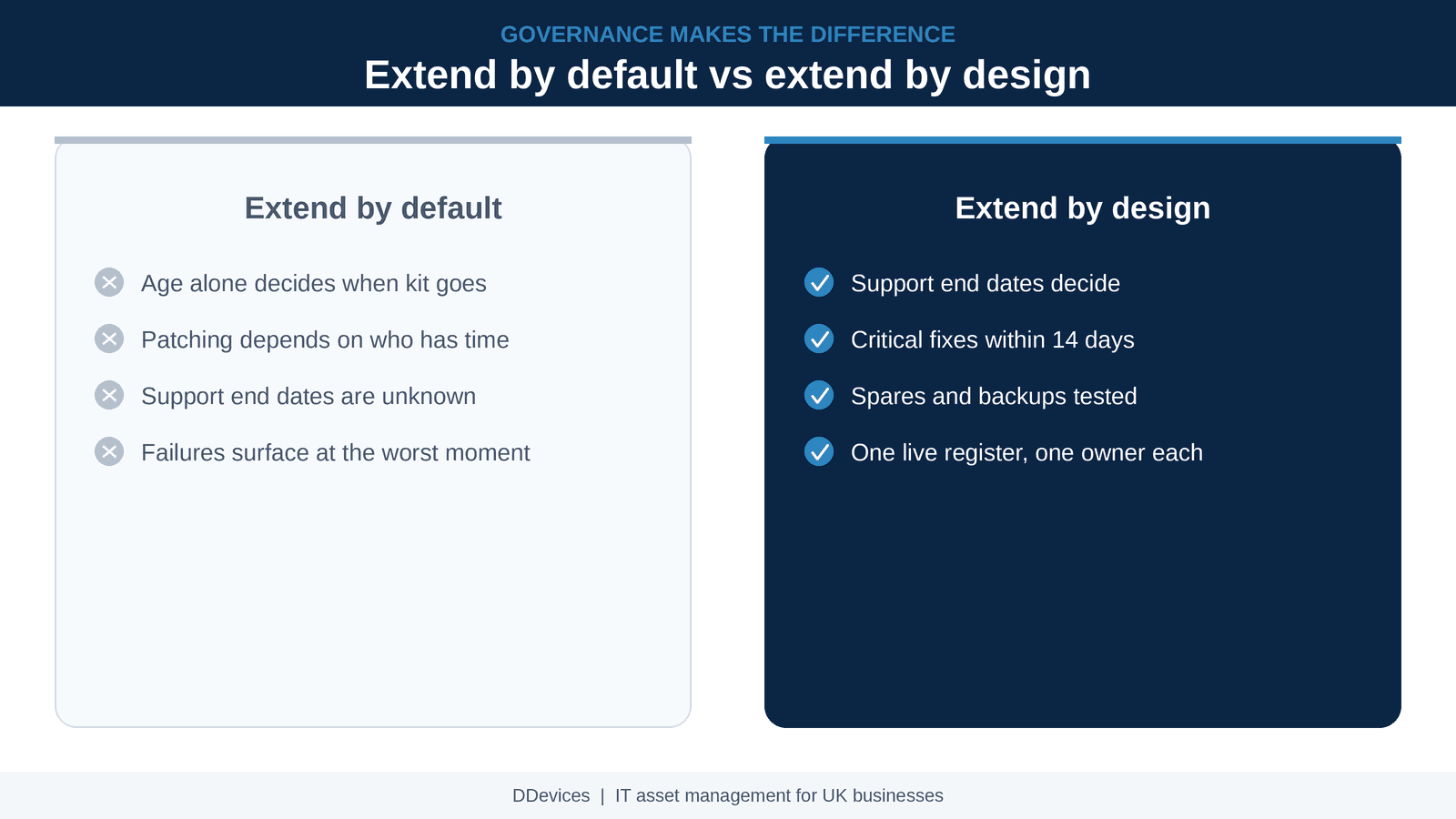
The gap between a safe extension and a risky one is governance. Here is how the two approaches compare. Start small: list your oldest device models, record each support end date and run each model through the gates. One decision then covers every device of that model.
The cost and carbon payoff
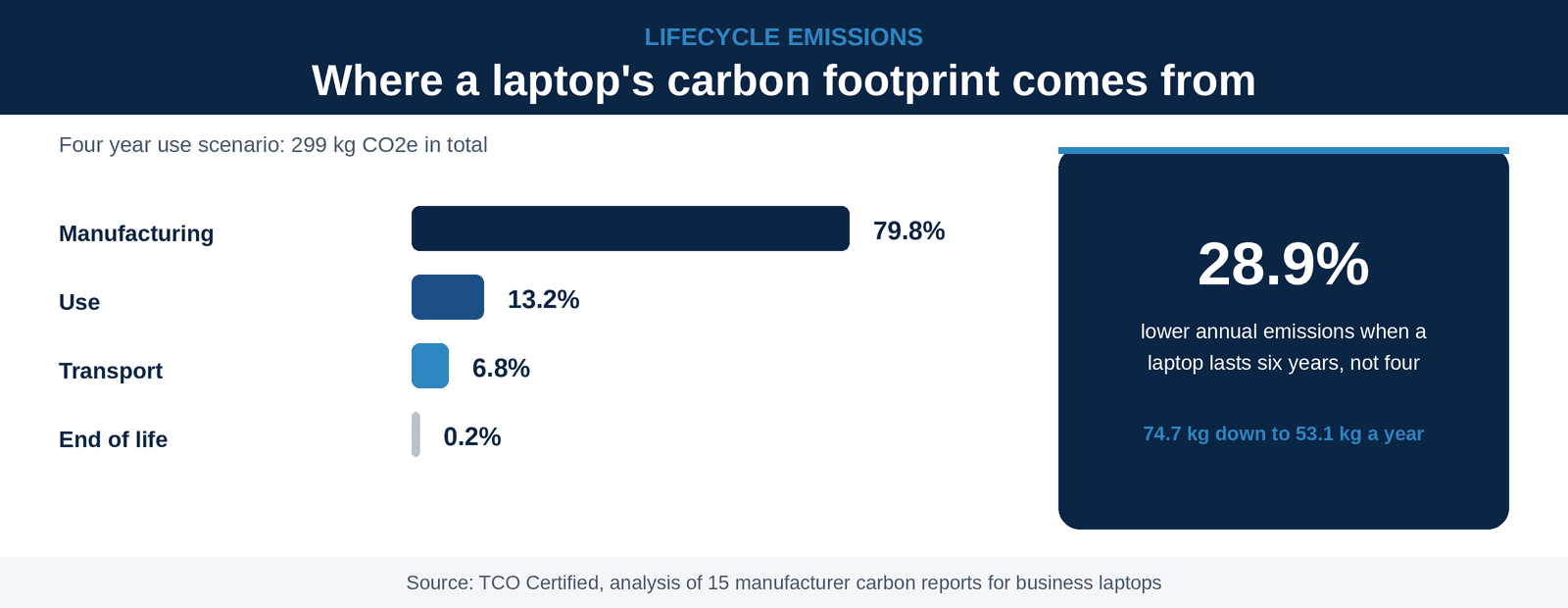
TCO Certified reviewed 15 manufacturer carbon reports for business laptops. Over a four year life, 79.8% of a laptop's emissions come from manufacturing. Keeping the laptop for six years lowers annual emissions from 74.7 kg to 53.1 kg of CO2e, a fall of 28.9%.
The wider picture backs this up. The UN reports that the world produced 62 million tonnes of electronic waste in 2022, and only 22.3% was documented as properly recycled.
Why UK organisations choose DDevices for IT lifecycle support
At DDevices, we help organisations across the UK keep technology working and risk under control. From our London base, we support the full IT lifecycle, from procurement and licensing advice to deployment and managed services. More than 2,500 customers trust us, and we hold ISO 9001 certification.
Our approach helps organisations:
- See what they own and when support ends.
- Decide which assets to extend, upgrade, isolate or retire.
- Source hardware and software from leading partners when replacement is the right call.
- Keep cyber security and compliance needs in view at every stage.
Whether you are planning your next refresh or stretching the current one, DDevices gives you the lifecycle expertise to decide with confidence.
Do you know where every device and licence stands today?
Talk to a DDevices specialist about mapping your IT lifecycle, from purchase to secure retirement.
Conclusion
Extending IT asset life is a sound response to rising prices, as long as support, patching, recovery and visibility stay in check. Age alone should never decide when an asset goes.
Start with a register that shows every support end date. Apply the four gates, then act on the result. Do that and longer lifecycles cut cost without adding risk.
Related reading
This guide is part of DDevices' IT lifecycle and procurement content hub. For related topics, see:
Frequently asked questions
IT asset management is the process of tracking hardware, software and cloud assets from purchase to retirement, so you know what you own, what it costs and when support ends.
There is no fixed number. Keep a laptop while it is supported, patched within 14 days and reliable. TCO Certified notes that laptops used for standard software can often serve at least six years.
The NCSC says the only fully effective fix is to stop using it. If you cannot yet, cut the asset off from the internet and set a firm exit date.
Software must be licensed and supported. Once support ends it must be removed or cut off from the internet, and critical fixes must go on within 14 days of release.
In most cases, yes. Gartner expects PC prices to be 17% higher than in 2025, and a German study cited by TCO Certified found that moving laptops from three years to six cut workstation costs by 28%, upgrades included. Price memory upgrades first, as memory is the costly part right now.
DDevices helps UK organisations plan refresh cycles, source hardware and software, and support their estate through managed services, so every asset is extended, upgraded or replaced at the right time.