24/7 IT Monitoring: Why It Matters for Modern Businesses
24/7 IT monitoring used to be something only large enterprises could justify. For most modern businesses, it is now closer to a baseline expectation.
Systems do not fail on a schedule, and attackers deliberately do not wait for office hours. A server can go down at 2am, a backup can silently fail overnight, or a ransomware attack can begin on a Saturday, with nobody watching until Monday morning.
This guide explains what 24/7 IT monitoring actually involves, why the gap between business-hours support and round-the-clock coverage matters so much more than it used to, and how businesses can build continuous monitoring into their IT strategy.
What is 24/7 IT monitoring?
24/7 IT monitoring is the continuous, round-the-clock observation of a business's servers, network, cloud platforms and security systems, with the goal of spotting and responding to problems as they happen, not after someone notices the next morning.
It combines automated monitoring tools, which watch for anomalies, failures and threats in real time, with human oversight from an engineer or security analyst who can investigate and act on genuine alerts, day or night.
The distinction matters. A tool that simply logs an error at 3am and waits for someone to read it at 9am is not really 24/7 monitoring. The 'monitoring' only has value if something, or someone, is actually watching and able to respond outside standard working hours.
Why 24/7 IT monitoring matters now
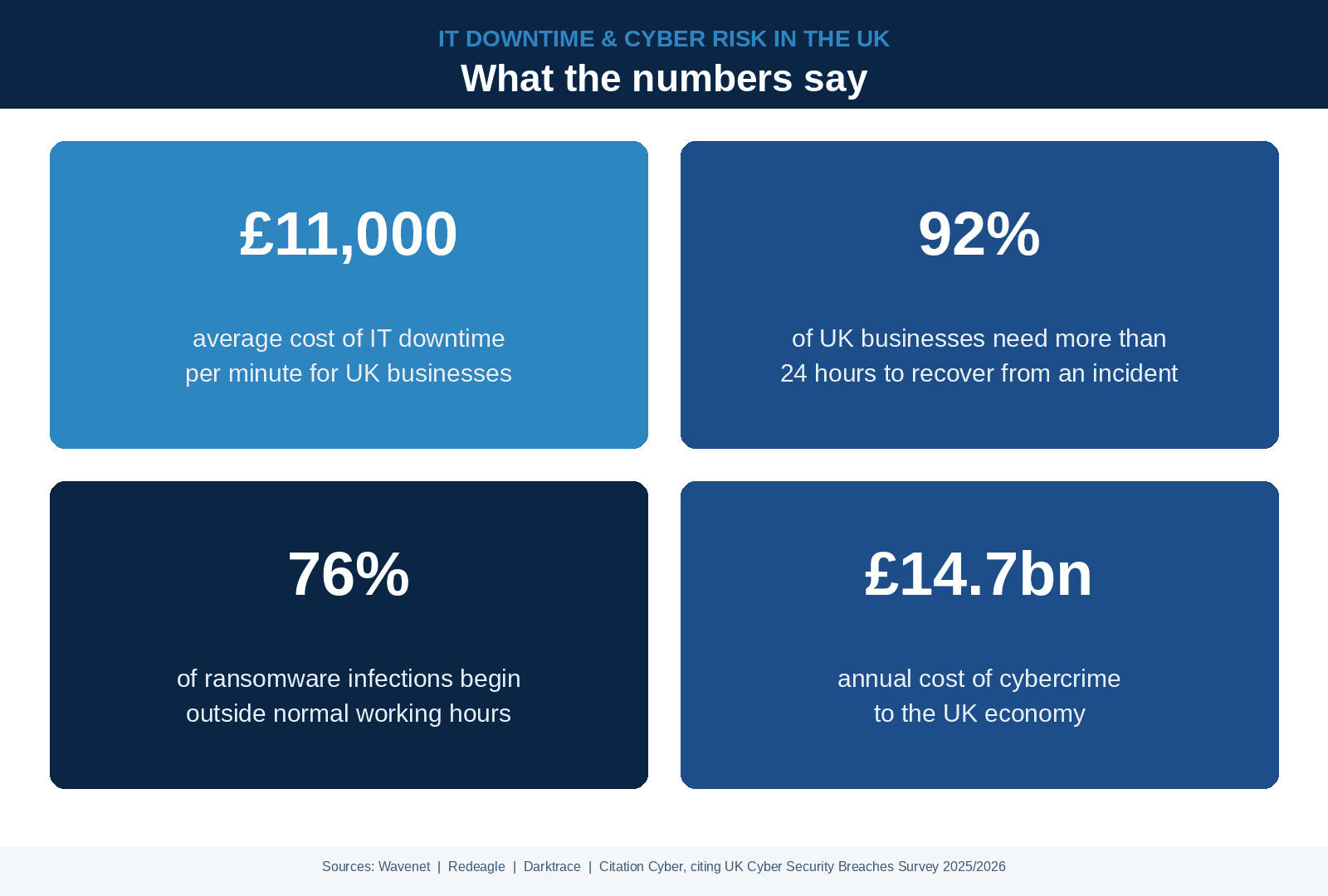
The financial case has become difficult to ignore. Downtime now costs UK businesses an average of £11,000 per minute, according to research from Wavenet, with the figure climbing considerably higher for larger or more digitally dependent organisations.
Recovery is not quick, either. As many as 92% of UK businesses need more than 24 hours to recover from a significant IT incident, according to analysis from Redeagle, meaning the longer a problem goes unnoticed, the longer and more expensive the recovery tends to be.
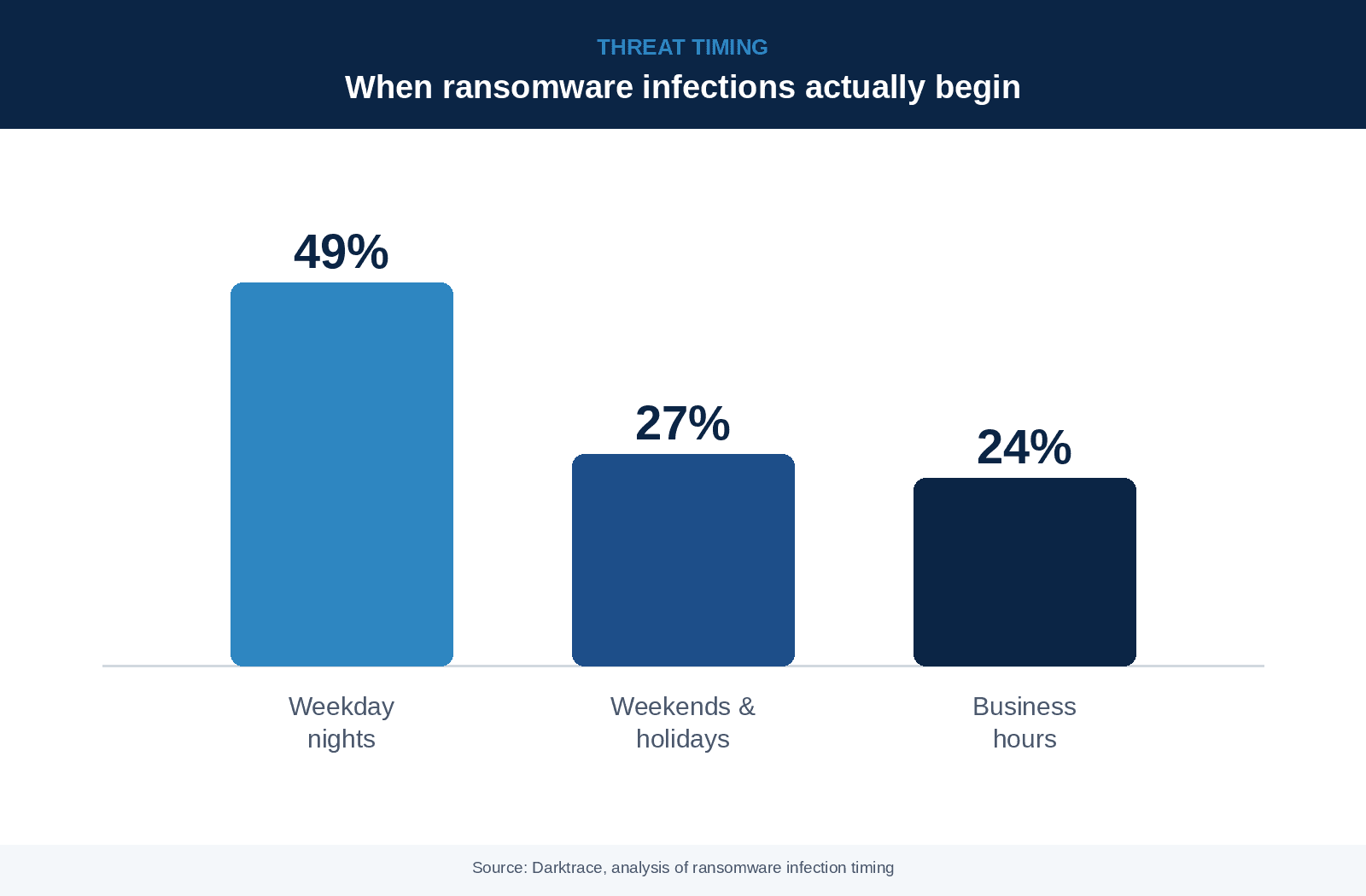
Attackers are also timing their moves deliberately. Research from Darktrace shows that 76% of ransomware infections begin outside normal working hours, precisely when staffing and awareness are at their lowest.
The cumulative cost is substantial. Cybercrime is estimated to cost the UK economy around £14.7 billion a year, according to Citation Cyber, citing the UK Government's Cyber Security Breaches Survey 2025/2026.
What does 24/7 IT monitoring actually cover?
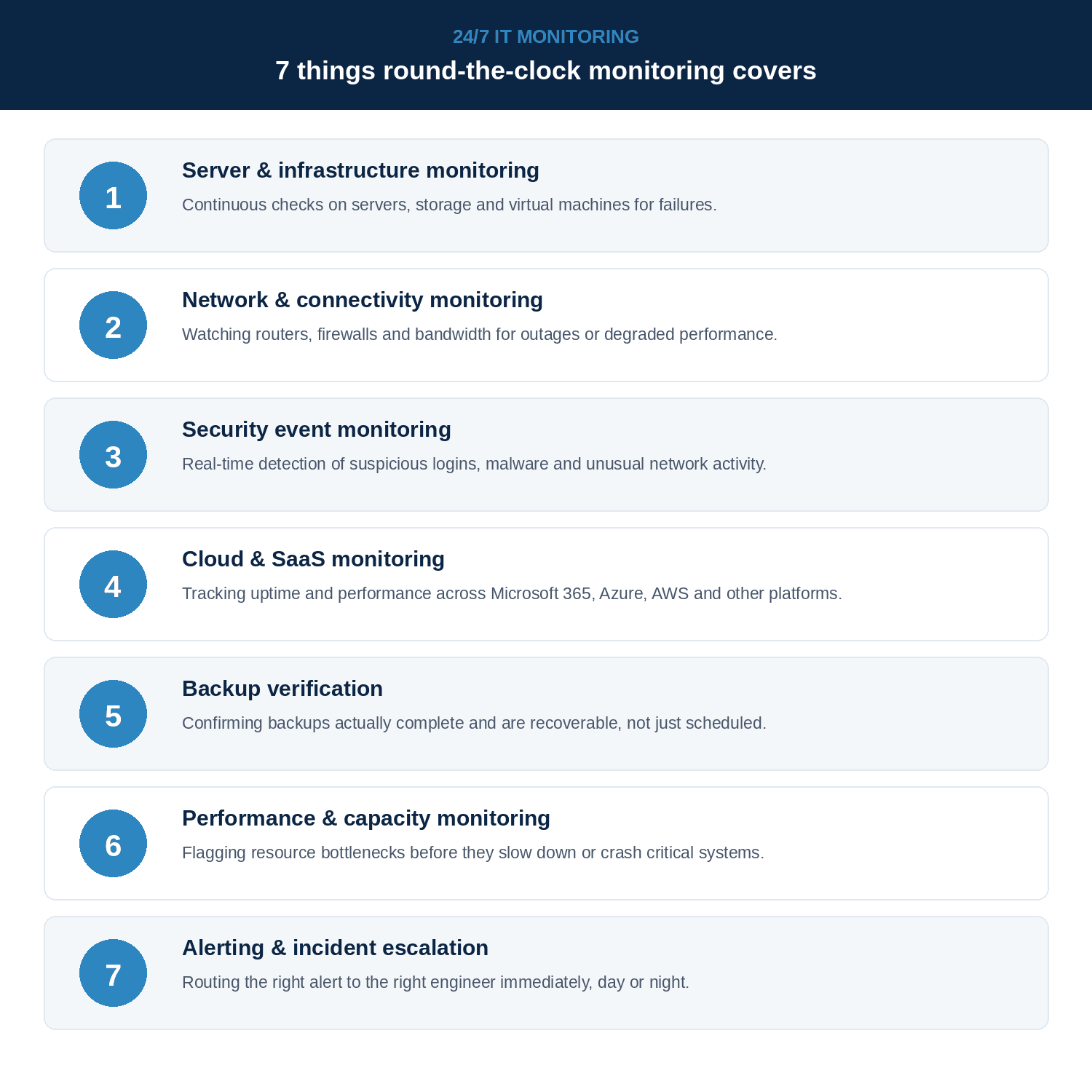
Coverage varies by provider, but a genuine 24/7 IT monitoring service typically spans seven core areas.
1. Server and Infrastructure Monitoring
CPU usage, memory, disk space, system logs and service health across physical and virtual servers, with alerts triggered when metrics breach defined thresholds.
2. Network Monitoring
Bandwidth usage, latency, packet loss and device availability across firewalls, switches and routers, including detection of unusual traffic patterns that could indicate a compromise.
3. Security Event Monitoring
Log analysis, intrusion detection, unusual login attempts, privilege escalation, and the kind of behavioural anomalies that suggest an attacker is already inside the environment.
4. Cloud and SaaS Monitoring
Performance, availability and configuration drift across Microsoft 365, AWS, Azure and other cloud platforms, including identity and access reviews.
5. Backup Verification
Regular automated checks that backups completed successfully and are restorable, not just that the backup job didn't error out.
6. Performance Monitoring
Application response times, database performance and end-user experience metrics that help identify degradation before users complain.
7. Alert Escalation
A defined procedure for notifying the right person when an alert is genuine, with documented escalation paths and response SLAs attached.
Business-hours support vs. 24/7 IT monitoring
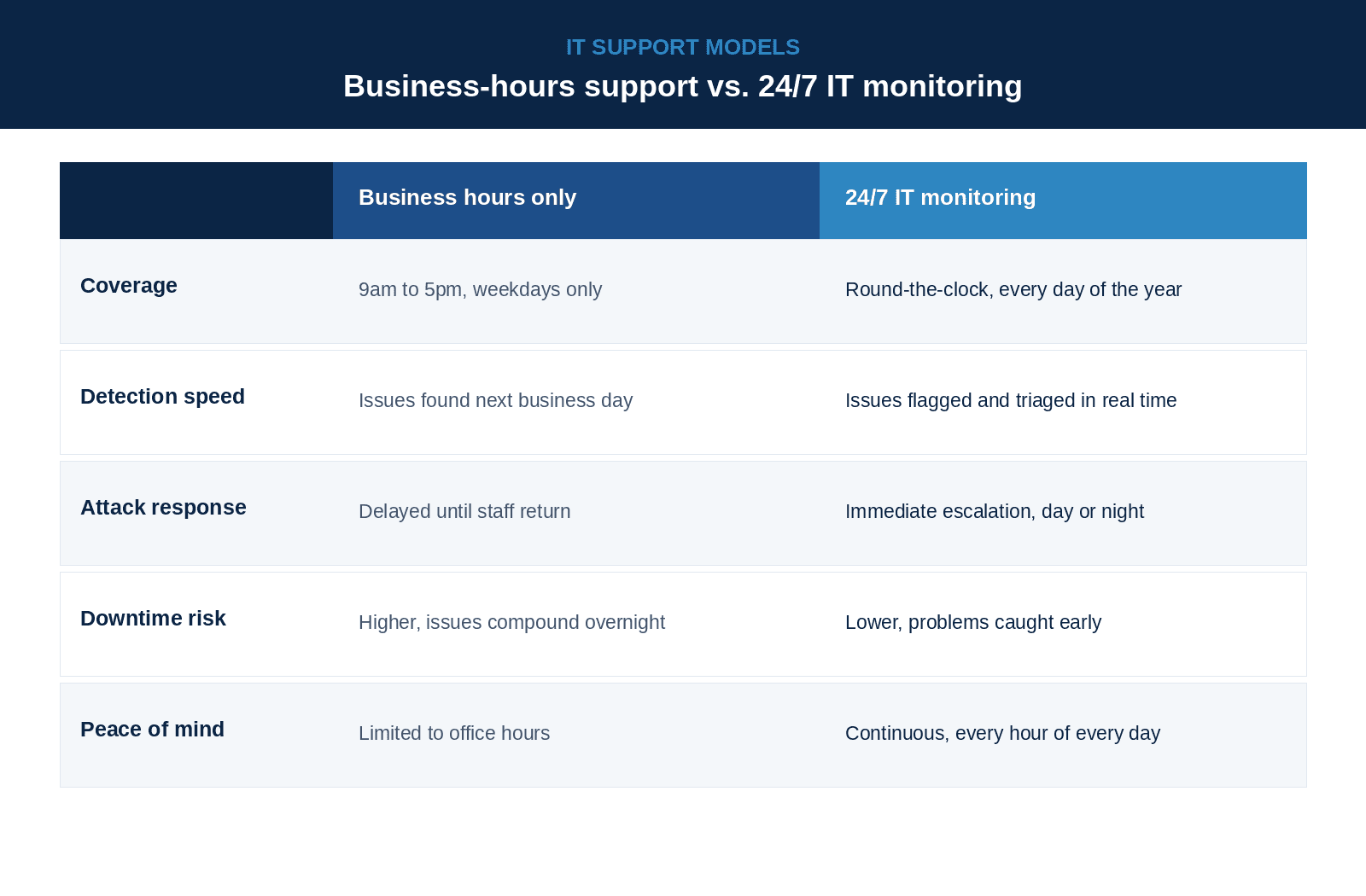
The practical difference between the two models comes down to how long a problem is allowed to run before anyone notices.
Building 24/7 monitoring into your IT strategy
Moving to round-the-clock coverage does not need to happen all at once. Most organisations get there by:
- Deploying centralised monitoring across servers, network, cloud platforms and endpoints
- Setting alert thresholds tied to business impact, not just raw system noise
- Ensuring genuine human oversight overnight, not only automated alerts nobody reads until morning
- Testing incident response procedures regularly, including out-of-hours drills
- Prioritising business-critical systems first, then expanding coverage outward
- Reviewing and refining alert thresholds regularly to reduce alert fatigue among the team
The aim is not to monitor everything equally. It is to make sure the systems that would actually hurt the business if they fail are being watched every hour, not just during the working day.
Frequently Asked Questions
24/7 IT monitoring is the continuous observation of a business's servers, network, cloud platforms and security systems, combining automated tools with human oversight to catch and respond to issues at any time, not just during office hours.
Systems fail and attacks happen outside standard working hours as often as within them. Without round-the-clock monitoring, problems can run unnoticed for hours, increasing both downtime and recovery costs.
A typical service covers server and infrastructure monitoring, network and connectivity checks, security event detection, cloud and SaaS monitoring, backup verification, performance monitoring, and alert escalation to a real engineer.
No. Managed IT providers now offer 24/7 monitoring as a standard service for businesses of all sizes, often at a fraction of the cost of building an in-house monitoring team.
24/7 monitoring is one component of what a managed IT services provider typically offers. An MSP usually also includes help desk support, cyber security, cloud management and strategic IT guidance alongside continuous monitoring.
Pricing usually scales with the number of devices, servers and systems covered. Most providers include it within a fixed monthly managed services fee, rather than charging separately for out-of-hours coverage.